
Counter-Controlled Loops
We use a counter-controlled loop when we want to iterate through a loop a specified number of times. Remember, there are different ways to specify the number of iterations. For instance, the number of iterations does not need to be a specific number like 57. The number of iterations can mean the loop should run as long as there are elements left in an array or as long as there are rows left in a result set. You may not know the exact number, but the array or result set does.
Counter-Controlled while Loop
Please study the image below.
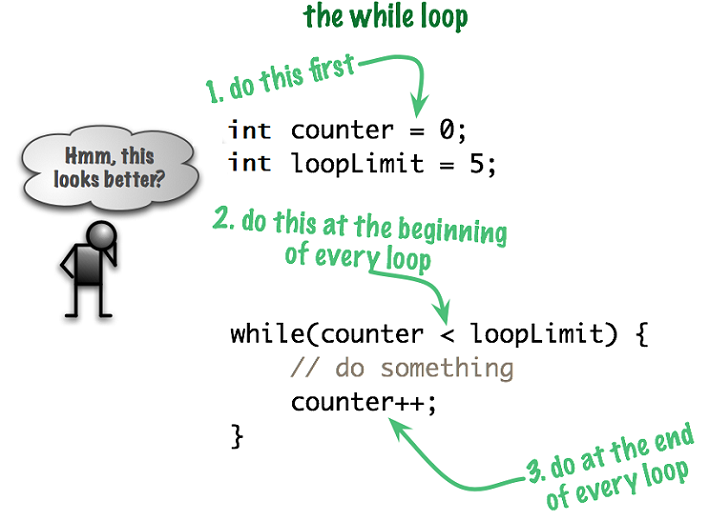
Notice we establish the value of counter before the loop signature. Our loop signature compares the value of counter with the value of loopLimit. This condition is a Boolean expression, therefore the question is asked, “Is it true that the value of counter is less than the value of loopLimit?” The variable counter is our iterator variable.
Any code within the body of the loop will run as long as the condition is true.
To avoid an infinite loop, we change our condition inside of the loop body. This is done with the code counter++; The operator ++ means increment my variable by 1.
Please study the Java code snippet below and its output.
private void repeatFiveTimes() {
  int counter = 0;
  int loopLimit = 5;

  while (counter < loopLimit) {
    System.out.println("The value of counter is: " + counter);
    counter++;
  }
}
Did you expect the displayed numbers to be 0 - 4? Remember the condition. As long as counter is less than loopLimit then the while loop runs. When the counter reached 5, counter is equal to loopLimit not less than. It is at that point, the condition is false, so the loop does not run any longer.
Counter-Controlled for Loop
Although the while can be used as a counter-controlled loop, the for loop is typically used for this task. Please study the image below.
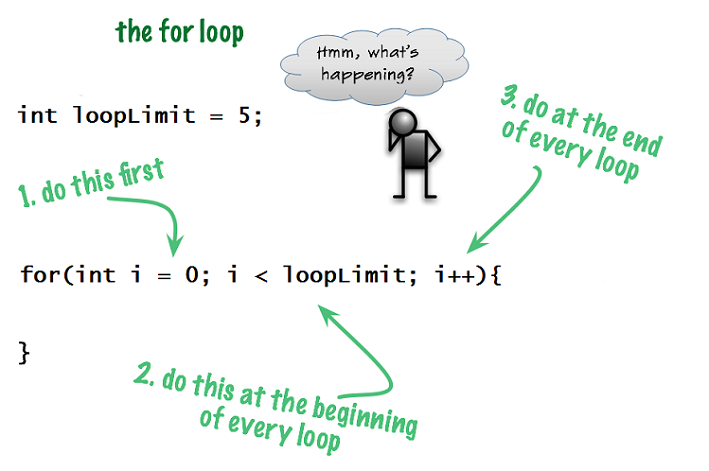
Notice we declare and establish the initial value of the variable i in the loop signature. I am sure you remember, according to the Northwood Tech Software Development Standards, i is an acceptable variable name for an iterator. However, when you have complicated code, or nested loops, you may want to use a more descriptive variable name.
The middle part of our loop signature, i < loopLimit, compares the value of i with the value of loopLimit. The question is asked, “Is it true that the value of i is less than the value of loopLimit?” If the condition is true, the code within the loop body runs. The value of i is incremented by one and the condition gets re-evaluated to determine if the code within the body should run again. The loop continues as long as the condition is true.
Below is the code structure for the basic for loop. I say basic because there is such a thing as the enhanced for loop, which is sometimes called a “for each loop”. The basic for loop has been the workhorse of loops for many decades. Its signature is always has these pieces: initialization; condition; and increment (or decrement).
// Java "for" loop structure
for (initialization; condition; increment) {
  //loop body
}
Here is the basic for loop structure with some code in it.
// Java counter-controlled loop using the "for" loop
for (int counter = 0; counter < 5; counter++) {
  System.out.println("The value of counter is: " + counter);
}
Please compare the two above examples so you fully understand the concepts.
- initialization is:
intcounter = 0; - condition is:
counter < 5; - increment is:
counter++
Always remember the semicolon between each section of the
for loop signature, BUT not after the increment.
You can decrement, meaning decrease instead of increase your iterator. One situation where you would want to decrement is when doing a countdown. Think about what else needs to change in order to achieve the desired results and prevent an infinite loop.
Below is the output of the sample Java code. Notice that for the first iteration through the loop, the variable counter has a value of 0 and after the last iteration, the value is 4. Both 0 and 4 are less than 5 so when counter equals 5, the code inside of the loop body does not run.
Remember, each time through a loop, the condition is re(evaluated) to determine if the condition is still true
The for loop is more concise and is generally preferred over the while loop when we know how many times a loop should be run. Make sure you pay attention to where you are placing the semicolons.
Remember, though, you may need to alter your code to meet requirements. This would be the case if the problem statement says to display numbers from 1 to 5. Please carefully study the code below.
for (int counter = 0; counter < 5; counter++) {
  System.out.println("Number: " + (counter + 1));
}
In the above example, we print the value of (counter + 1). It is important to realize the statement counter + 1 does NOT increment the variable counter. You are just displaying the value of counter plus 1.
It is common practice to initialize your iterator variable to zero, however, another approach to solve the problem is to initialize your iterator variable to the number 1. You would also need to change your condition test to myCounter <= 5 to ensure the number five is displayed. If we simply used < 5, only 1 to 4 prints. Please study the code below.
for (int counter = 1; counter <= 5; counter++) {
  System.out.println("Number: " + (counter));
}
If we initialized counter to zero and we used <= 5 as our condition, then our code would be logically wrong according to our requirements, which are to repeat the loop five times and display the numbers 1-5. 0,1,2,3,4,5 is six iterations of the loop, not five. We call these “off-by-one errors”.
What You Learned
You learned you must identify the variables contained within your condition BEFORE you get into the loop. Remember, order matters! In our example, counter and
loopLimit have been declared and initialized before the condition in the loop is tested. This holds true for both the while and for loop.
When you use a while loop for a predetermined number of iterations, you MUST remember to increment (or decrement) your counter variable.
The syntax for the for loop can be tricky. If you have a logic error, you could get into an infinite loop situation. An infinite loop is a loop that does not stop. An infinite loop occurs when there is no way the condition can become false. Infinite loops can occur in a while loop also. Typically this happens when you forget to change your condition inside of the loop body.
It is common to use the lowercase letter i as your iterator variable in a looping situation. Think of it this way, i stands for iterator! However, when you have complicated code, or nested loops, you may want to use a more descriptive variable.
In a while loop, you must declare and initialize your iterator variable outside of the loop body and increment or decrement the variable inside the loop body.
You can declare and initialize your for loop iterator variable before the loop signature. However, it is common practice to declare and initialize your iterator variable inside of the signature of the for loop. The increment or decrement of your iterator variable always takes place in the signature of the for loop.
Lastly, you learned about “off-by-one errors”.
What's Next
After carefully reviewing the images and code snippets on this page, go to the chapter on condition-controlled loops.