
Methods that Return a Value
This chapter, focuses on methods that return a value, and we fine tune what we already learned. Remember, not all methods have void as their return type. You can specify a return type, such as double, String, or int. Remember, in this course, we will use private as the access modifier for all our methods accept the constructor and main().
Keep in mind, the code is not done, until it is done. I know that sound ridiculous, but as you are thinking through and then coding a solution, you may end up changing the signature and the code of your methods. Whenever you create a program, write a small bit of code, test, and repeat.
Return Types
A method that returns a value has one data type as its return value. You cannot return more than one value unless the values are within an object or container. That means, use a data type, such as double, String, or int to specify the return type of your method.
Remember, in Java, all methods are coded within a class. Each method has a signature followed by a beginning curly brace, your code that does the work, and finally an ending curly brace. However, in a method that returns a value, the last line of code before the ending curly brace must contain the keyword return followed by what is being returned.
Naming Methods
Remember, a method that returns a value is going to give something back to the caller. These method names show action and may start with words such as “get”, “calculate”, “validate”, or “is”. This is not a hard and fast rule, but it should help you when choosing method names.
(Re)using Methods that Return a Value
The getMonth() method below accepts an int parameter named month. All the method does is take in a number and return the name of the month associated with the number. This is a very simple example of re-usability. All you do is send an int into the method and it works. Remember, a method that returns a value must include the keyword return and when you call a method that returns a value, you need a variable to catch the returned value.
private String getMonth(int month){

   String monthName;

   //code here for determining the name of the month
   //based on the number being sent into the method

   return monthName;

}//end of getMonth
Who is in Charge?
The method is in charge. The method says, if you want to use me, you MUST send me what I want. Remember, sometimes the method does not want anything. However, in the case of the getMonth() method example above, you MUST send in an int variable. Remember, the data types and order of the parameters matters! The method says, send me what I want and make sure the data types match and you send them in the order they are listed in the method signature. Oh, yeah, and by the way, when you are calling me, I really do not care if you use the same variable names. But if I am returning a value, you should be prepare to accept the returned value.
Remember, your method signatures must be unique within the same class.
Signature of a Method that Returns a Value
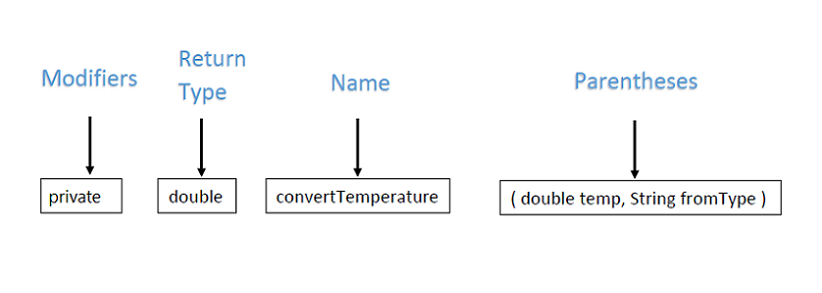
Each method is made up of the same pieces parts; a modifier, return type, method name, and parentheses. Remember, any data inside of parentheses is generically called a parameter. You can have zero or more parameters in your method signature. Parameters, which are just variables being accepted into a method signature, always contain a data type.
In this course, we will use private as the access modifier for all of our methods, except main() and our constructor. An access modifier of private means that your method cannot be seen outside of its containing class. The return type other than void means the method returns a value to its caller.
Below is a method signature that accepts parameters and returns a value. This method accepts one double variable and one String variable as parameters. It also returns a value that is of type double. Keep in mind that the return type can be any data type.
Remember, if you return a value you need to have a variable ready to catch the returned value. Therefore, in Program Logic, the call to a method that returns a value ALWAYS has this format:
variableThatWillAcceptReturnedValue = nameOfMethodThatReturnsTheValue();
The parentheses may or may not contain arguments.
One Primary Task
Discovering the primary tasks of your methods helps to decide whether or not the method needs parameters and whether or not the method should return a value. Okay, this is NOT a hard and fast rule, but many methods that return values accept parameters.
The theory is, you want your method that returns a value to manipulate or validate data and return the results. Therefore, you need to send in the data. Remember, this is NOT a hard and fast rule, but it should help when designing your programs.
You are already familiar with the following problem statement:
A program is required to prompt the end-user for the maximum and minimum temperature readings on a particular day, accept those readings as integers, and calculate and display to the screen the average temperature, calculated by (maximum temperature + minimum temperature)/2.
Calling Methods
Remember a method signature always includes the parentheses. The parentheses can be with or without parameters. Remember, if the method is expecting parameters, you need to supply the parameters when calling the method. Technically, when data is supplied in the call, the data is referred to as arguments. When the data is received in the method signature, the data is referred to as parameters.
Here are some calls to methods that are needed in our problem statement. Notice some include arguments within the parentheses. Also notice the calls do not include data types. This is because the data type should already be known within the method that created the variables. Pay attention to the calculateAverage() call. The variable average accepts the value returned from the method.
getUserInput();
average = calculateAverage(minTemperture, maxTemperature);
displayMessage(average);
Think Logically
It is also important to remember not all methods need to be called from within the constructor. It may make more sense to call a method from within another method.
Logic must prevail when calling methods. Looking at the above calls you know the method calculateAverage() needs two variables because the call is sending two arguments. But where are the variables declared? Logically speaking, they are declared in the method getUserInput(). It is also safe to assume that getUserInput() supplies values to the variables minTemperture and maxTemperature. Remember variable scope. Since the variable values are supplied within getUserInput(), then it is logical to assume the call to calculateAverage() happens when those variables and their values are known. In other words, after both the variables have valid values, call calculateAverage() passing it the variables.
Let's spin the logic out a bit further. Based on our example, the variable average should get its value AFTER the average is calculated. The difference between this example and my void method example is that the value for average is calculated within the method calculateAverage() and then RETURNED to the caller. In this case, the variable average accepts the value returned when calculateAverage() is called. Following the example, it is safe to say that displayMessage() is called after average has its value.
Logically, you could:
- call
getUserInput()from within the constructor - call
calculateAverage()from withingetUserInput(), but AFTER the variables have valid values. - call
displayMessage()from withingetUserInput(), but AFTER the variable average has a valid value. Better yet, send a nice message that includes the average temperature todisplayMessage()
In this example calculateAverage(), returns a value to the caller. Since calculateAverage() is called from within getUserInput(), then the value of average is known within getUserInput(). That in turn means that displayMessage must also be called from within getUserInput().
IMPORTANT! The data types of the arguments and the order of the arguments MUST MATCH the data types of the parameters and the order of the parameters. The names do not need to match. The variable that catches the returned value MUST match the data type of the variable being returned, the names do not need to match.
Choosing between void Methods and Methods that Return a Value
Typically a program is a combination of void methods and methods that return a value. But how do you know when to use which one. Basically, it is a design decision that encompasses at least the problem you are trying to solve, the structure of your program, and re-usability. Validation methods and methods that manipulate your data are good candidates for methods that return a value. As illustrated in this unit, the same problem statement can have different solutions. Following our 5-Step Solution Algorithm or creating a flowchart will help you make design decisions.
Assignment Information
Please see Blackboard for assignment preparation tasks and assignment details.
What's next?
This concludes the unit on Algorithms and Methods. After completing the homework assignments, please continue to the next unit.