
Example 2: Dual Alternative Decision ( if/else )
This example will show you how to "decide" which way your program will
run, based on the simple if/else statement. Remember, you are in
charge, the program is only going to do what you tell it to do.
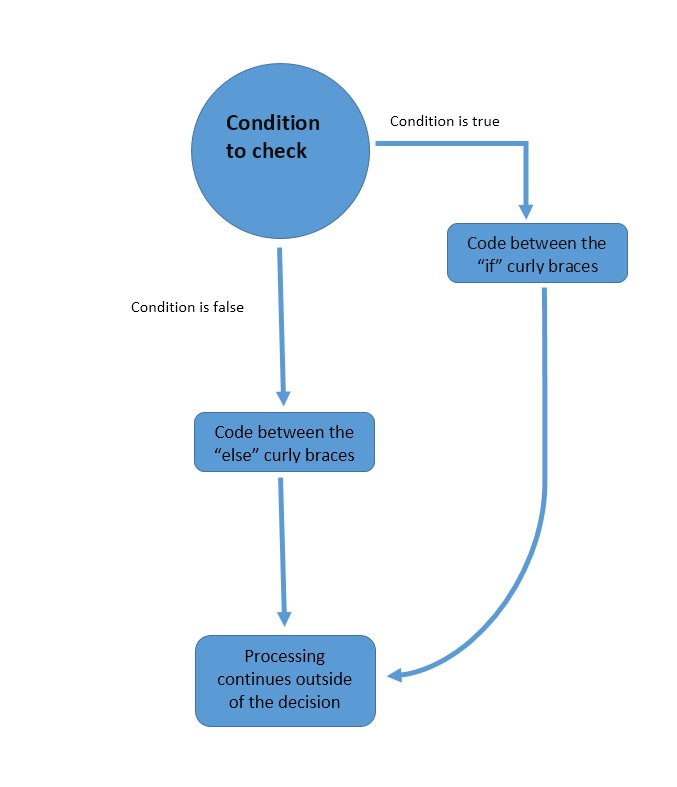
Decision statements are not just for controlling input and output. They control the flow of your program; that is really important when you write complex programs. When we branch our code, we can literally go down two completely different paths. We can, for example, check the value the end-user gives us, and only run the rest of our program if the value is valid.
Remember when I said decision structures are like flow-charting your code. Below is a flow-chart graphic for a dual alternative decision statement.
Problem Statement
A program is required that asks the end-user to enter two numbers. If the second number is not zero then divide the first number by the second number and output the results. If the second is zero then notify the end-user that they entered a zero and division by zero is not possible.
1. Nouns and Verbs
Identify the nouns and verbs in the problem statement.
PROBLEM STATEMENT:
    A program is required that asks the end-user to enter two numbers.
	If the second number is not zero then divide the first number by the
	second number and output the results. If the second is zero then let
	the end-user know that they entered a zero and division by zero is not possible.

Nouns: two numbers, zero, results

Verbs: asks, divide, output, notify
2. Defining Diagram
Convert the nouns and verbs into variable names and processes and create a defining diagram.
INPUTS:
  numberOne
  numberTwo

PROCESSING:
  prompt user for numberOne
  prompt user for numberTwo
  check numberTwo for zero and notify user based on value
  divide numberOne by numberTwo
  output results

OUTPUTS:
  numberOne
  numberTwo
  results
  message
3. Solution Algorithm
Create a solution algorithm based on the defining diagram.
public Constructor(){
  call safelyDivideTwoNumbers();
}

private method safelyDivideTwoNumbers(){
  declare and initialize double numberOne that will hold end-user input
  declare and initialize double numberTwo that will hold end-user input
  declare and initialize double results which is calculated by the program

  instantiate Scanner object using input as its variable

  print to the console "Please enter the first number"
  if(valid input){
     save the input.nextDouble() value into the numberOne variable
  }
  else {
    clear scanner using input.next() so other input can be made
  }

  print to the console "Please enter the second number"
  if(valid input){
     save the input.nextDouble() value into the numberTwo variable
  }


  if (numberTwo is 0) {
    print to the console "Division by zero cannot be done"
  }
  else{
    set results = numberOne / numberTwo
    display a message using the variables numberOne, numberTwo, and results
  }
}
4. Test Plan
Create a test plan for the algorithm.
VARIABLES: numberOne, numberTwo

TEST CASE 1:

  INPUT VALUES: y, r

  EXPECTED RESULT: The program runs as designed with the result of: You have entered a zero. Cannot compute.

  ACTUAL RESULT: The program runs as designed with the result of: You have entered a zero. Cannot compute.

TEST CASE 2:

  INPUT VALUES: 10, 0

  EXPECTED RESULT: The program runs as designed with the result of: You have entered a zero. Cannot compute.

  ACTUAL RESULT: The program runs as designed with the result: of You have entered a zero. Cannot compute.

TEST CASE 3:

  INPUT VALUES: 0, 7

  EXPECTED RESULT: The program runs as designed with the result of 0.0 divided by 7.0 is 0.0

  ACTUAL RESULT: The program runs as designed with the result of 0.0 divided by 7.0 is 0.0
5. Java Code
Write the Java source code based on the solution algorithm. Test your code using the test plan.
Below is a Java code snippet that determines which discount should be applied. A working Java solution must also include a class, constructor, as well as the main method and necessary import statements. Please study the code.
REALLY IMPORTANT! The hasNextDouble() methods are to get you used to end-user validation. As is, the results are not what you may expect if the end-user does not enter a number. Also, this code does not give the end-user the opportunity to try again. These details were left out in the interest of clarity for the topic at hand...Dual Alternative Decision Statements.
I challenge you to create a NetBeans project using this code. First run the code as printed below. Then comment out the input.next(); statement and run the code again. Notice a difference? Finally, enter a letter for the second number. Do you know why you were told you entered a zero?
// Safely Divide Two Numbers
private void safelyDivideTwoNumbers() {

	// Declare and initialize variables
	double numberOne = 0.0;
	double numberTwo = 0.0;
	double results = 0.0;

      //instantiate Scanner object using input as its variable
	Scanner input = new Scanner(System.in);

      //print to the console "Please enter the first number"
	System.out.println("Please enter your first number");

      //if(valid input)
        if(input.hasNextDouble()){
          //save the input.nextDouble() value into the numberOne variable
            numberOne = input.nextDouble();
        }
        else{
            //clear scanner using input.next() so other input can be made
            input.next();
        }

      //print to the console "Please enter the second number"
        System.out.println("Please enter your second number");

      //if(valid input)
        if(input.hasNextDouble()){
		    //save the input.nextDouble() value into the numberTwo variable
            numberTwo = input.nextDouble();
        }

      //if (numberTwo is 0)
	if (numberTwo == 0) {
	  //print to the console "Division by zero cannot be done"
	  System.out.println("You have entered a zero. Cannot compute");
	}
	else {
	  //set results = numberOne / numberTwo
	  results = numberOne / numberTwo;
	  //print to the console "Division by zero cannot be done"
	  System.out.println(numberOne + " divided by " + numberTwo + " is " + results);
	}

}//end safelyDivideTwoNumbers()
Study the code above and think about why numberTwo is compared to zero in the if condition. Remember, in programming order matters. Logically, it makes sense to check for zero in the if statement. Because when an if statement evaluates to true then the else statement is skipped. In this example, that means if numberTwo is the same as zero, then our error message is printed and the else is skipped.
Below is an example of the output if the numberOne is 10 and numberTwo is 2.