
Multiple Boolean Expressions
In a multiple Boolean expression, a decision is still being made. However, that decision depends on the truthfulness of more than one Boolean expression. We use logical operators to separate the expressions.
This OR That, This AND That
- If I were taller
ORthat shelf was lower, I could reach the can of soup. - Could I have 20 ones
ORa ten and 10 onesOReven 2 fives and 10 ones? - You must wear a shirt
ANDshoes to enter this store! - If you are older than 5
ANDyounger than 12 then the cost is $1.00
Sometimes we want to have multiple conditions because one just is not enough. In that case, we use logical operators, such as the logical OR (||) and the logical AND (&&) operators.
The Logical OR ( || ) Operator
When you have a logical OR to write and you are writing the 5-Step Solution Algorithm, you can code the logical OR structure as shown below, where “varA” represents one variable and “this” and “that” are two different options being compared to “varA” and of course the run code would be fleshed-out. Please note, you could have different variables being compared to “this or that”.
IF (varA < this OR varA > that) {
  run the this OR that code
}
In Java, as in many languages, the logical OR is coded as two vertical bars ( || ). The vertical bar key is in different places depending on the keyboard. Where is it on yours? Mine is above the enter key and I need to press the shift key to access it.
Please study the code below. Notice that we are using the logical || operator in conjunction with a decision statement...If this OR that. Also notice we are making two distinct comparisons on each side of the logical || operator. On the left side of the logical || operator, our expression compares the variable number to the number literal 5. On the right side of the logical || operator our expression compares the variable number to the number literal 20.
 // Logical ||
  int number = 25;

  if(number < 5 || number > 20){
     System.out.println("The number is good");
  }
When you use the logical || operator, if either one of the expressions evaluates to true, the entire condition is considered true. Think of it this way, if the left expression is true OR the right expression is true, the entire statement is true.
Remember, the condition in a decision statement is a Boolean expression.
When you use the logical ||operator, you ask yourself: Is one of
the expressions true?
Please study the image below.
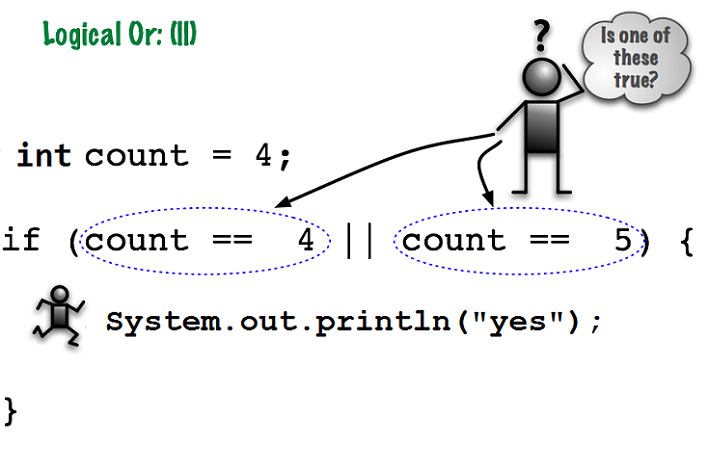
An important concept to remember with using the logical || operator is that both Boolean expressions do NOT need to be true at the same time. Only one OR the other needs to be true for the entire condition to be true. In the image above, the variable count will not equal 4 AND 5 at the same time.
The Logical AND ( && ) Operator
When you have a logical AND to write and you are writing the 5-Step Solution Algorithm, you can code the logical AND structure as shown below, where “varA” represents one variable, “varB” represents a different variable and “this” and “that” are two different options being compared to the variables; and of course the run code would be fleshed-out. Please note, you could have same variables being compared to “this and that”.
IF (varA < this AND varB > that) {
  run the this AND that code
}
In Java, as in many languages, the logical AND is two ampersand signs &&. The ampersand is located on the same key as the number seven at the top of my keyboard. I must press the shift key to access it. Please take time to find your ampersand key.
Please study the code below. Notice that we are using the logical && operator in conjunction with a decision statement...If this AND that. Also notice we are making two distinct comparisons on each side of the logical && operator.
// Logical &&
int code = 5;
int numberOne = 30;

if(numberOne > 25 && code == 5){
   System.out.println("Bonus time!");
}
else{
   System.out.println("No bonus this year");
}
Both Boolean expressions MUST be true. If either one is false then the whole thing is false. Also notice that we are comparing two different conditions. One condition uses the variable numberOne and the other condition uses the variable code.
Common Errors
Remember, you MUST repeat the variable name after a logical operator. Many new programmers forget to repeat the variable name. Notice the difference between the two code snippets below. If you do not include the variable on the right of the logical || operator, you may get the error, illegal start of expression or > expected. Please carefully study the code below.
The following statement is incorrect because the variable name was not repeated.
// Wrong!
if (number > 10 || < 1)  //<-- Wrong, missing variable name!
The following statement is correct because the variable name is repeated.
// Right!
if (number > 10 || number < 1)   //<-- You always have to have
                                    // a complete boolean expression
                                    // on each side of the ||
Another common error is picking the correct logical operator. Remember, with the logical ||, either side of the operator can be true and that makes the whole thing true. With the logical &&, both sides of the operator must be true. Typically, but not always, the logical && compares two different variables to different conditions. When the variables are the same, always ask yourself “can my variable be both these conditions at the same time”
To better illustrate this point, study the image below. Is it possible for count to be greater than zero AND less than or equal to ten, at the same time. In this image, it is, so the logical && is appropriate.
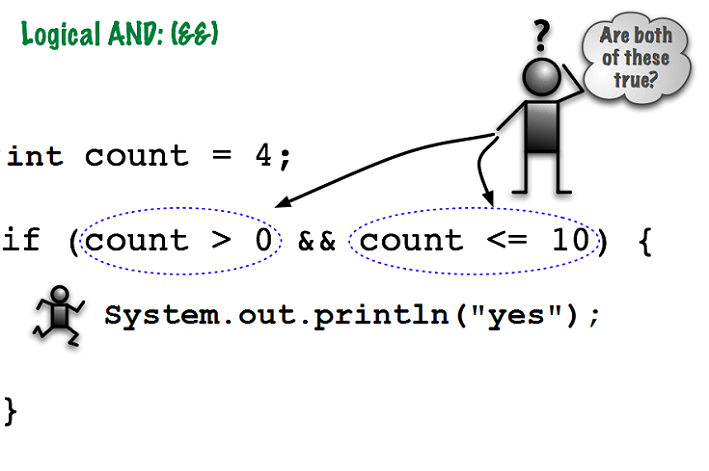
Remember the logical || image? There it was not possible for count to be equal to 4 AND 5 at the same time. In that image, the logical || was appropriate. Your take-away should be to pay attention to the relational operators AND the logical operator.
Short-Circuit Evaluation
Here is a handy efficiency built into Java: both && and || use short-circuit evaluation, meaning Java stops evaluating a Boolean expression as soon as the overall result is already known. With &&, if the left side is false, the whole expression must be false, so Java never bothers checking the right side. With ||, if the left side is true, the whole expression must be true, so again, the right side is skipped.
This is more than a performance detail; it is a pattern you will see constantly in real Java code, especially to avoid errors. Please study the code below.
// Short-circuit evaluation avoids a crash
String name = null;

if (name != null && name.length() > 0) {
  System.out.println("The name has a value");
}
If name is null, the left side of the && is false, so Java never evaluates name.length(). This matters because calling a method on a null variable would otherwise crash your program. Notice the order of the two conditions is important here; if they were reversed, the code would crash before the null check ever had a chance to protect you.
Detailed Example
Here is a detailed example of using the Multiple Boolean Expressions. This example contains the 5-Step Solution Algorithm including the Java code. I highly recommend that you create a NetBeans project, type the Java code into it, add the comments, and test the program according to the test plan.
What's next?
After carefully reviewing the detailed example linked above, go to the chapter on Nested Decision Structures.